

App-Controlled vs. Remote-Controlled Sex Toys: Which Should You Buy?

A remote control and a phone app can both change a toy’s settings without touching the buttons on the device itself. But they solve different problems.
A simple dedicated remote may be excellent across a room, while an app-enabled toy can offer patterns, customization or partner control from another city—if the product and the software actually support those features.
At a glance: quick comparison
Compare | Dedicated remote | Phone app |
|---|---|---|
Setup | Pair supplied controller | Install and pair app |
Nearby range | Model-specific wireless | Bluetooth depends on conditions |
Long distance | Usually not built in | Only supported apps via internet |
Privacy | Often no online account | Check account and data policies |
Best fit | Fast, simple close control | Patterns and supported partner play |
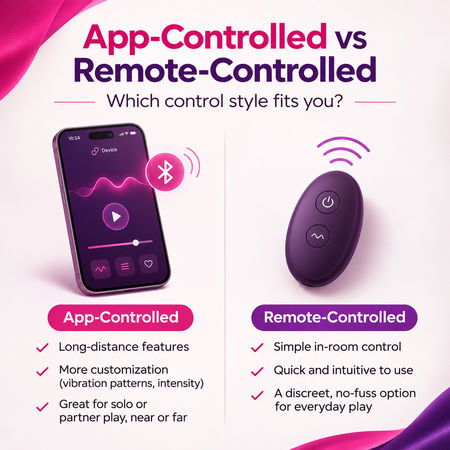
Swipe or scroll the comparison table horizontally if you're reading on a narrow screen. The detailed sections below explain where each option works best.
Start with the three types of control
On-device controls are the buttons built into the toy. Dedicated remote controls send commands from a separate handheld controller, using the wireless system supplied by that particular manufacturer.
App control connects the toy to a phone or tablet, commonly using Bluetooth for the nearby connection. Some apps can then relay partner commands over the internet. Bluetooth connectivity by itself does not automatically mean worldwide control.
Range: across the room is not across the world
A physical remote is often the easiest option for close-range partnered use: pair it as instructed, keep it within the manufacturer’s stated range, and use it without registering a smartphone account.
Its actual working range may drop around walls, bodies and interference. Do not assume every remote uses Bluetooth or that every model has the same range.
App-enabled toys typically connect from toy to phone over Bluetooth. Bluetooth range is not one universal number; hardware, obstacles and the environment influence it.
Long-distance play works only where an app specifically supports internet-connected partner sessions, with a compatible phone near the toy and connectivity at both ends.
From our counter: why local remote control wins so often
The biggest surprise from our Edmonton customers is how often they choose simple, nearby partner control over worldwide internet features. A dedicated wireless remote is responsive and convenient when two people are in the same room or on a date; nobody has to unlock a phone or navigate an app just to change a setting.
Our usual advice is straightforward: if you don't need a partner to control the toy from thousands of kilometres away, don't pay extra solely for internet connectivity. Pick the fit, stimulation and controller that suit your actual plans. A physical remote is not automatically Bluetooth, and the manufacturer's rated range still matters.
Privacy: the detail too many buying guides skip
A physical remote usually avoids an app account and internet traffic during normal use. App control may involve permissions, user profiles, pairing records, cloud features or messaging.
That does not mean every app is unsafe, but privacy terms and software maintenance matter.
Before pairing, read the app’s privacy policy, check what information it collects, use a strong unique password if an account is required, and keep your phone updated.
Consider notification previews and account sharing too. A long-distance feature is only as private as the phone and accounts used to operate it. Disable permissions you do not need; if you stop using a device, remove old pairings or accounts where the app offers those controls.
What customers tell us about range and pairing
We have helped shoppers with Bluetooth pairing problems and occasional disconnections, particularly when a wearable device is inserted and the phone is no longer in a clear position. Bodies, walls, furniture and wireless interference can reduce signal strength. A failed connection does not automatically mean the toy itself is faulty.
When demonstrating a physical remote, we often say: if you can see the person using the toy, you have a better chance of a strong, responsive connection. That's a practical store rule of thumb—not a guaranteed range test. Walls and the human body can still interfere, and different models use different wireless systems.
We also get asked whether the remote needs charging. Many use small replaceable coin-cell batteries, but not every remote does. For example, the We-Vibe Chorus Pro includes a rechargeable controller. Check the specific model rather than assuming all remotes use watch batteries.
Batteries and reliability
A dedicated remote may use replaceable batteries or have its own rechargeable cell, while a phone-operated device draws on the phone battery and usually also needs the toy charged.
A separate remote can be convenient when you do not want a screen nearby. An app can be more versatile, but requires installation, compatibility with your phone’s operating system and occasional updates.
Check whether the toy’s built-in controls continue to work without the app. That fallback matters if your phone is unavailable, an update breaks compatibility or you simply want a low-tech evening. Keep all electronics dry unless the manufacturer explicitly rates them for water exposure.
What actually makes long-distance control work?
For long-distance use, look for an explicit partner-invite or internet-control feature. A compatible app commonly connects locally to the toy using Bluetooth, while the remote partner’s commands travel between phones over the internet.
Both people may need the same app, active connectivity and consent to pair. Test the setup in advance rather than assuming it will work perfectly on the first try.
Real products worth comparing
Rather than treating all 'smart toys' as one category, compare the We-Vibe Jive 2 and We-Vibe Chorus Pro. Both offer the option of physical remote and app control, letting shoppers choose based on the situation. The LELO Kaya Originals and LELO Surfer Originals are examples of LELO's app-compatible Originals lineup. Features vary even within the same collection, so confirm what the exact model supports.
For nearby control without a phone, look at Tracy's Dog Wearable Panty Vibrator (metallic), the wireless pink or wireless teal versions, and the Tracy's Dog wearable anal vibrator. These are physical-remote examples, not claims of app-based long-distance control. For more connected choices browse LELO's range or We-Vibe.
Products we actually show customers: app, remote or both
We-Vibe Jive 2 — A wearable egg-style vibrator with app and dedicated remote options. Useful when you want to switch between phone-based features and easy nearby control. Confirm the exact connection method before planning distance play.
We-Vibe Chorus Pro — A couples model combining the We-Vibe app with a tactile Haptic Squeeze remote. The physical squeeze control makes a strong case for local partner play even when app customization is available.
LELO Kaya Originals — A dual-stimulation rabbit vibrator whose listing describes built-in settings and additional modes through the LELO app. The Originals range is a practical option for shoppers considering connected features at a more accessible LELO price point.
LELO Surfer Originals — A prostate-focused vibrator with built-in controls and additional settings through the LELO app. It's a useful example of why the right body fit and intended use matter at least as much as connectivity.
LELO Moka Originals — An ergonomic G-spot vibrator we also discuss with shoppers comparing the Originals line. Its current listing doesn't establish the same app or wireless-remote capability, so treat this as a shape-and-function comparison, not a confirmed remote-control recommendation.
LELO Lifeguard Originals — A vibrating couples ring with built-in controls and app-enabled additional modes. The product listing notes first-time app activation, which is worth understanding before purchasing.
Tracy's Dog Wearable Panty Vibrator (metallic), pink, teal and Wearable Anal Vibrator — Examples of wearable products with dedicated wireless remotes when local partner control is the goal. Confirm which design and dimensions work for your body and intended use.
The decision guide
Choose a physical remote if you care most about quick setup, in-room control and fewer phone dependencies.
Choose app control if custom patterns, independent motor adjustment or genuinely supported long-distance partner play justify the extra setup. Choose a toy with manual buttons as well if you want a practical fallback.
Paying more for connectivity you will never use is not an upgrade.
Compare app and remote-controlled toys locally in Edmonton
Our Edmonton store can help you compare the We-Vibe Chorus Pro with its rechargeable haptic squeeze remote and app controls, the Jive 2, and a simpler Tracy's Dog wireless panty vibrator. Where a display model is available we can demonstrate control response, but packaging and manufacturer specifications remain the source of truth for actual wireless ranges.
Frequently asked questions
Does Bluetooth work over the internet?
No. Bluetooth connects nearby devices. Certain apps add a separate internet connection for long-distance partner control.
Will an app-controlled vibrator work without Wi-Fi?
Nearby Bluetooth control may work without Wi-Fi, but app setup and internet partner sessions can require mobile data or Wi-Fi. Check the product’s requirements.
Can anyone nearby take control?
Pairing and access rules vary. Treat the device as connected technology: follow pairing instructions, control account access and review the manufacturer’s privacy information.
Want to compare the controls in person? Visit Mommys Toy Shop in Edmonton or arrange a private shopping appointment.
What happens if the phone disconnects?
A dropped Bluetooth connection can interrupt app-based control even when the toy is functioning normally. Walls, a phone tucked away from the device, radio interference and battery state can all affect reliability.
If your ideal experience requires uninterrupted control, check what the device does when its connection drops: does it keep the previous setting, stop or switch back to buttons? This behaviour is model-specific.
A dedicated physical remote can be faster to hand to a partner, but it can also be lost, have a dead battery or require re-pairing. Neither option is fault-proof.
In-store comparisons are useful because a remote with clear buttons may feel easier than an app menu, particularly if you prefer not to look at a phone during use.
Internet control and partner consent
Long-distance features should be deliberately enabled by the person with the toy, not assumed to be a permanent open connection. Check whether the app provides an invitation, a session code, a temporary authorization or account-based pairing.
Look for a clear way to pause or revoke control immediately. Read each product's current support documentation because app features can be changed or discontinued independently of the hardware.
Both partners should agree on the settings and how to stop. Test the connection with the toy off-body before relying on it.
If one person is in Edmonton and the other is outside Alberta—or outside Canada—the distance between them is not the Bluetooth issue.
What matters is whether the maker offers internet partner control and both sides have supported phones and network connectivity.
Accessibility and the problem with tiny buttons
App interfaces can help some shoppers by offering a larger screen and customizable patterns. They may be less suitable for others because of small controls, notifications, operating-system compatibility or the need to unlock a phone.
Dedicated remotes also vary: raised buttons and simple layouts can be easier to operate without looking, while very small controllers are easy to confuse. Consider dexterity, visibility and comfort when narrowing your choices.
What a real demo tells you—and what it can't
One of our more memorable shop displays is the Naked Addiction rotating and thrusting silicone dildo with wireless remote. It's kept behind a metal display cage, and the remote shows just how visibly it can thrust and rotate. Customers get to see the mechanism without anyone needing to handle an intimate product.
That demonstration is also a good reminder that a controller can work in one environment and behave differently in another. A successful in-store demo doesn't prove the device will work through every wall or from every position. Also, this Naked Addiction product uses a dedicated wireless remote; it's not an example of internet-enabled control.
A pre-purchase compatibility checklist
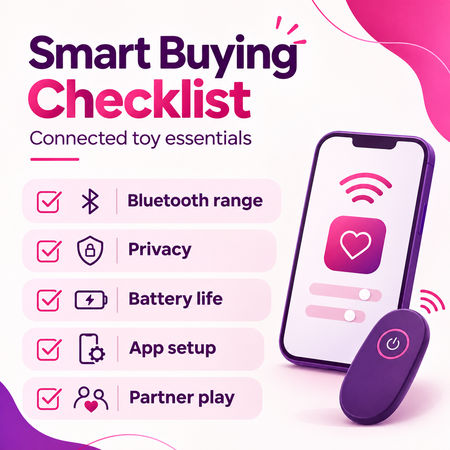
Before checkout, check the brand and exact app name, supported phone operating systems, whether an account is necessary, whether the toy can operate with no phone, and whether partners can connect over the internet.
Confirm how the device and remote charge. Don't assume 'app connected' is synonymous with 'long-distance enabled,' or that compatible-looking models pair across different brands.
Choosing locally in Edmonton
At Mommys Toy Shop in Edmonton, we start by asking how you're actually planning to use the toy. Is it for a couple together on a date, or for partners separated by a long distance? Do you want a wearable or insertable device, or something intended only for external use? Those answers narrow the options far more quickly than 'which app toy is best?'
Browse couples toys and Edmonton adult store information to shortlist options. If privacy matters while discussing connected devices, book a private visit. We can explain advertised features, but app-provider policies and live service availability must still be checked with the manufacturer.
Our advice for couples, date nights and long-distance partners
For partners who will be physically together, start by comparing wearable toys with a dedicated remote, like the Tracy's Dog panty vibrators or a We-Vibe with a physical controller. Keeping the control simple is usually the point of the experience.
For long-distance couples, look for a specific app feature that sends partner commands over the internet. LELO Love Bridge and the apps from We-Vibe and Satisfyer offer more customization and connected possibilities on supported models, but the specific toy and current app version determine what works.
Our customers commonly shop around a $90–$200 budget for connected toys. That can cover a range of LELO Originals and We-Vibe options, but price alone shouldn't decide it. First choose the intended activity and fit. Then ask whether the added connectivity will genuinely be useful.
The bottom line
For in-room control with minimum setup, a dedicated remote is usually the simpler starting point. For customized routines or verified internet partner sessions, an app can justify the complexity. Your best option is the one that still works comfortably and privately in the situations where you will actually use it.
Share this buying guide
Like this guide? Share it with someone comparing their options. Sharing links will work once the article is published.

